App Redesign
Planned Parenthood


ABOUT
Planned Parenthood Direct is an app provided by Planned Parenthood, which is the nation’s leading provider of sexual and reproductive health care for all people, as well as the nation’s largest provider of sex education.
The App is designed to make it easier than ever to get birth control, emergency contraception, and UTI treatment. It advertises with convenient home delivery or pharmacy pickup options claiming prescriptions will always be stress-free, affordable, and completely private.
The Problem
The current Planned Parenthood Direct app is primarily structured around first-time or occasional use, rather than supporting ongoing care and repeat interactions. As a result, key user flows for returning users feel buried or fragmented.
The information architecture is cluttered and the navigation is not always intuitive, making it difficult for users to quickly locate essential actions such as prescription management, refills and order history. This creates unnecessary steps in what should be a simple, time-sensitive experience.
Overall, this leads to friction in core tasks and reduces the efficiency and clarity needed for managing personal healthcare through the app.
The User
For many, Planned Parenthood is the only place they can go for the services they need and the app makes that access even easier.
The majority of users are women, though many services are available for non-binary and trans people or men, for example seeking STI testing or sexual health check ups. Users range from students to working adults, first-timers to regulars, across all backgrounds and income levels.
Whether they're ordering a birth control refill, getting emergency contraception or treating a UTI from home, the common thread is convenience. The emphasis is on fast and private care that they can manage on their own terms from their phone, without the hassle of phone calls or waiting rooms.

Age
19
LOcation
Rockford, IL
Occupation
Student
Status
Single
Mia just started college and is looking to start using birth control for the first time. Navigating reproductive healthcare on her own feels new and slightly overwhelming. She's done some online research before but finds conflicting information that are hard to make sense of. She's unsure which contraception is right for her but knows she wants it delivered, since she lives rather far from town and doesn't have a car. Privacy is also important to her. She is still on her parents' insurance and would rather they not see the charges.
She also has very irregular periods and already uses an app to track them. She's comfortable with her phone and uses it for everything, but she's on a tight student budget and needs the process to be simple, clear and judgment-free.

Age
38
LOcation
Philadelphia, PA
Occupation
Retail Manager
Status
Married
Jasmine is a mother with a busy home and work life that leaves little room for unnecessary errands. She's been a Planned Parenthood patient for years, first in person and later through the app. It's a provider she already knows and trusts since using it for birth control refills before getting care related to her pregnancy.
After having her child, she got an IUD and now uses the app to manage the rest of her reproductive health. She books her occasional check-in appointments through the app, orders at-home STI tests when needed, and relies on the period tracker to keep an eye on changes since getting the IUD. PP Direct makes it easy to follow through, affordably and privately, whenever she has a spare moment.
SOLUTION
The first thing I addressed with my redesign is the information architecture. I looked at the main home page and the current the menu and identified the hierarchy of the content.
What stood out was the options displayed on the main page. Except for the button at the top of the page nothing indicated access to information or actions on an ongoing prescription for users who are already using birth control regularly. To get to that the user would have to open the side menu and click on 'Order History', which could be unintentional, to then see options for 'Details and Refills' and 'My Prescription' which might be confusing since both options are related to the prescription.
Instead of having to take these steps to find information and actions on an ongoing prescription I eliminated the extra navigation steps and established a clear option on the main page so the user doesn't have to spend time trying to make their way to the option they need. With that I also got rid of dividing related information into separate pages for a faster and intuitive experience to achieve the goal.


Current Design
Note: The 'Confirm Refill' button on the bottom of the screen will trigger the event immediately, meaning the user's card will be charged and the refill request is automatically initiated. In my design there is no ambiguity about the button that triggers the refill and the user can review their shipping address and payment method before confirming.


New Design
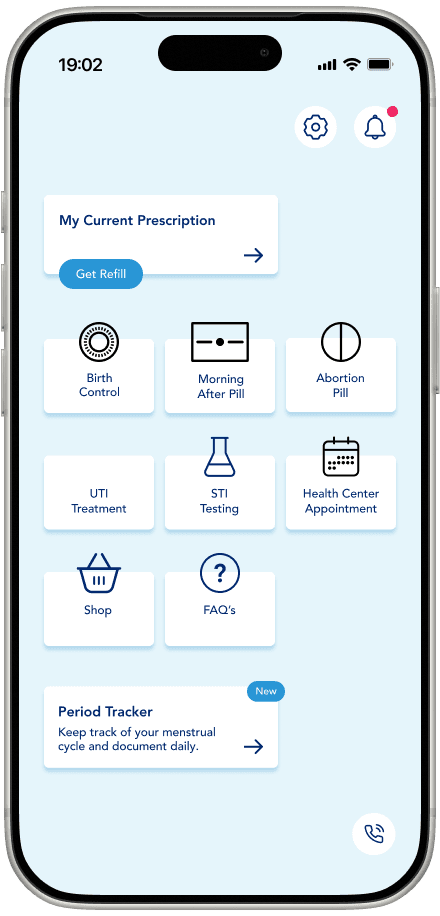
The user can order a refill right away through the home screen or click on the panel first to get additional information and options before doing so. Within that screen they are also directly able to chat with Planned Parenthood support or view their order history.
Instead of displaying any announcements on the home screen the user can now see them and other notifications under the dedicated section as well as access settings quickly from any screen. The settings are divided into logical sections for a better overview.


For the redesign of the Log In/ Sign Up screen I reduced the information workload on the starter page and distributed it onto multiple pages based on the path the user chooses. For the Sign up option that means asking only for the the user's email before adding password and their current state in the next step when they have decided to go through with the sign up.
On the Log In screen there is an option to stay signed in so the user doesn't have to authenticate themselves every time they open the app like it is now.


New Design
One of the new features established in the redesign is the period tracker which allows people with menstruations to keep track for personal or medical reasons. It eliminates the need for a separate app to do so and lets the users track their cycle alongside their prescriptions, appointments and care history, all within the same app they already use.
[In Progress:] Another concept I added is the Refill Reminder/ Refill Subscription
View full prototype in Figma